A single ELD violation in 2026 can hit your wallet for up to $16,000, and with the FMCSA aggressively cleaning up its registry this July, the risk of an out-of-service order has never been higher. When that screen freezes or the engine sync light starts blinking red, your first thought is usually about the clock and the looming threat of a roadside inspection. You are likely wondering exactly what happens if my eld malfunctions while you are hundreds of miles from the home terminal. It is a gut-wrenching feeling that every seasoned driver dreads, but a hardware failure does not have to end in a massive fine, a forced shutdown, or a permanent mark on your safety record.
We understand the frustration of dealing with glitchy tech when you just want to keep the wheels turning and the freight moving. This guide provides the exact three step protocol you need to follow to stay DOT compliant and keep your inspection reports clean. We will walk through the 24 hour notification rule, the specific way to reconstruct your paper logs, and how to handle the 8 day repair window without losing your mind. By the time you finish reading, you will know how to turn a potential regulatory nightmare into a minor speed bump on your route.
Key Takeaways
- Act fast by documenting the exact time of failure and notifying your carrier in writing within the mandatory 24-hour window.
- Stay legal by understanding what happens if my eld malfunctions and how to properly reconstruct your records of duty status on paper logs.
- Master the art of the roadside inspection by presenting your malfunction instruction sheet and paper logs before the officer even checks your screen.
- Keep your truck moving by meeting the carrier’s 8-day repair deadline or securing an official FMCSA extension when parts are backordered.
- Protect your livelihood by investing in reliable hardware that avoids “ghost” failures and always keeping a physical logbook in the cab.
Immediate Steps for ELD Failure
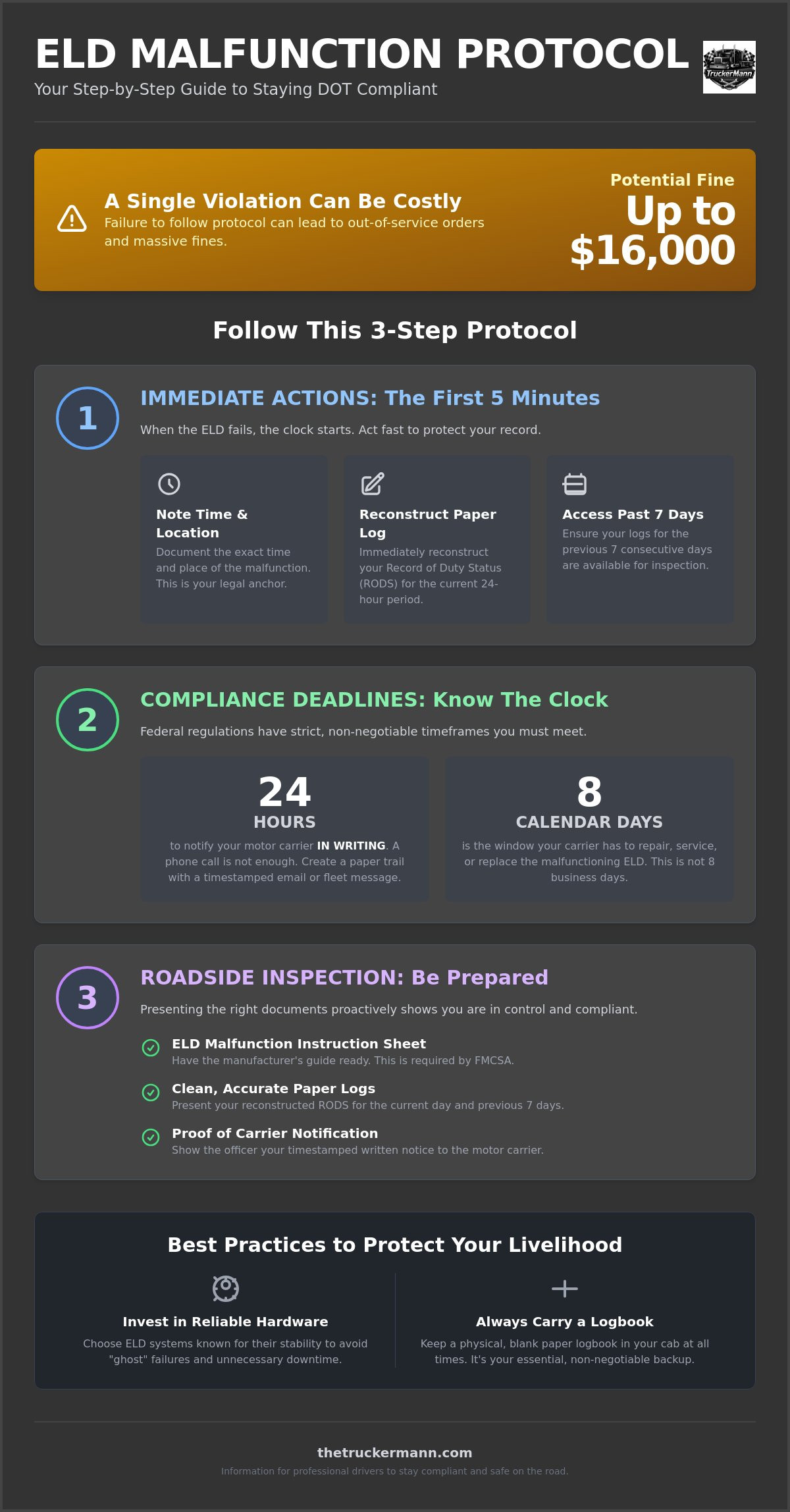
The moment your screen freezes or that dreaded red malfunction light starts blinking, the clock starts ticking. You don’t have time to pull over and read a 500-page manual. You need to act. The first five minutes after a failure are the most critical for protecting your CDL and avoiding a fine that can reach up to $16,000. Start by noting the exact time and your current location. This isn’t just for your company; it is the legal anchor point for your transition to paper logs. If an officer asks what happens if my eld malfunctions during a stop, your ability to point to a specific timestamp and location shows you are in control of the situation.
Once you’ve secured your location, your next move is to grab your physical logbook. You are required to reconstruct your Record of Duty Status (RODS) for the current 24-hour period immediately. This means you need to account for every minute from your last successful ELD sync up to the present moment. You must also ensure you have your logs for the previous seven consecutive days available for inspection. If your Electronic Logging Device (ELD) can’t display them, you’ll need to have those records in paper form or another compliant digital format ready to show a badge.
To better understand the transition from digital to manual logging, watch this helpful video:
The 24-Hour Notification Rule
Federal law is clear: you must notify your motor carrier in writing within 24 hours of discovering the malfunction. Don’t just call dispatch and assume they’ll handle it. A phone call leaves no paper trail. Use your fleet messaging system or a timestamped email to create a legal shield for yourself. In your message, include the unit number, the specific malfunction code if available, and the time the device failed. Keep a copy of this message on your phone or printed out. If you get pulled into a scale house, showing that you’ve already reported the issue makes you look like a professional, not a violator.
Switching to Paper Logs Correctly
The biggest mistake drivers make is leaving a “gap” between their last digital entry and their first paper line. Your paper log must pick up exactly where the ELD left off. If the device died while you were mid-trip, draw your line to reflect the driving time you’ve already completed. Accuracy here is vital because inspectors will cross-reference your paper entries with fuel receipts and toll data. For a full breakdown of how to prepare for these high-stakes moments, check out The Ultimate DOT Inspection Level 1 Checklist. Keeping your logs clean during a failure is the difference between a “clear” inspection and a week-long headache.
FMCSA Rules for Paper Logs
When the screen goes dark, you aren’t just a driver anymore; you are a compliance officer in the cab. Federal regulation 49 CFR 395.34 is the specific rulebook that dictates your moves when technology fails. Understanding what happens if my eld malfunctions is about more than just drawing lines on a grid; it is about knowing the federal playbook to avoid being placed out of service. You must immediately transition to paper logs, and these records must be as detailed as the digital ones. Your reconstructed log needs to include your name, the carrier’s name, the vehicle number, and the total miles driven for the day. If you are looking to brush up on your skills before the next Roadcheck, you can invest in professional training to stay ahead of the curve.
The FMCSA is strict about documentation because they want to ensure safety isn’t compromised when the tech quits. If you find yourself explaining what happens if my eld malfunctions to a DOT officer, having a clean paper log and the required instruction sheet is your best defense. Every driver is legally required to carry a physical or digital ELD instruction sheet and a malfunction guide provided by the manufacturer. According to the FMCSA rules for ELD malfunctions, failing to produce these documents during an inspection is a common violation that can lead to unnecessary fines. It is a small piece of paper, but it acts as your legal proof that you know the protocol.
The 8-Day Clock
The 8-day repair window is the most misunderstood part of the regulation. This clock starts ticking the moment you or the motor carrier “discovers the condition.” It is not eight business days; it is eight calendar days. If you are on a long-haul run that keeps you out past that eighth day, your carrier must file for an extension with the FMCSA Division Administrator. Don’t risk driving on day nine without an official extension in hand, or you will likely face an out-of-service order at the next scale.
Instruction Sheet and Malfunction Guide
Missing your malfunction guide is an avoidable mistake that seasoned veterans never make. This guide explains how to identify specific error codes, such as engine sync or power compliance issues. If yours is lost or buried under a pile of receipts, find a digital backup on the manufacturer’s website and save it to your phone’s home screen. For more deep dives into staying legal on the road, read our comprehensive guide on ELD Compliance in 2026.
Surviving a Roadside Inspection
When you see the blue lights in your mirror, your blood pressure shouldn’t spike just because your tech failed. The key to surviving a roadside inspection with a broken device is radical transparency. Don’t wait for the inspector to climb onto your step and see a blank screen or a flashing red light. As soon as they ask for your logs, lead with the facts. Tell them clearly that your device is down. This proactive approach sets a professional tone and shows you aren’t trying to hide hours. If you’ve ever wondered what happens if my eld malfunctions during a high-stakes stop, the answer depends entirely on how prepared you look when you hand over your paperwork.
You must be ready to present three things immediately: your current day’s paper log, your reconstructed logs for the previous seven days, and your ELD malfunction instruction sheet. The inspector will check these against the FMCSA rules for ELD malfunctions to ensure you’re following the legal script. It is also vital to distinguish between a “Data Diagnostic Event” and a true “Malfunction.” A diagnostic event is often a warning that the device lost GPS or power briefly, while a malfunction means the device is no longer reliably recording your status. If it is a malfunction, you must go to paper. If it is just a diagnostic event, you might still be able to use the device after a simple reboot.
The Roadside Script
Confidence comes from knowing exactly what to say. Use a script like this: “Officer, my ELD malfunctioned at [Time] in [Location]. I have already notified my carrier’s safety department in writing, and I have my reconstructed paper logs ready for your review, including the last seven days.” This shows you are in total control. If the officer isn’t familiar with your specific device’s error codes, having that manufacturer’s malfunction guide ready to show them can prevent a “failure to provide” violation. It turns a potential ticket into a conversation between two professionals.
Common Roadside Pitfalls
The fastest way to get a ticket is to claim you didn’t know the device was broken. Ignorance is never a legal defense in the eyes of the DOT. Another massive trap is having “blank” paper logs. Carrying a logbook is useless if it isn’t filled out up to your last change of duty status. If you are stuck at a terminal or a shop waiting for a replacement unit, use 123Loadboard to find a short-haul load that keeps you moving within the legal 8-day window. Never let a hardware glitch stop your cash flow, but never roll with empty logs either.
The 8-Day Repair Deadline
The 8-day clock is the final countdown for your compliance. If you’ve been wondering what happens if my eld malfunctions while you’re across the country, you need to know that the FMCSA doesn’t give much wiggle room. Your motor carrier has exactly eight calendar days to repair, replace, or service that unit. This isn’t business days; the clock doesn’t stop for weekends or holidays. If that device isn’t back online by day eight, you are technically operating without a compliant log. That is a fast track to an out-of-service order and a heavy fine.
The burden of the fix is on the carrier, but the driver is the one who faces the inspector. If the company can’t get it fixed because of backordered parts or shop delays, they must file for an extension. This request has to hit the FMCSA Division Administrator’s desk within five days of you notifying the company. If they wait until day seven, it’s too late. The agency is cracking down hard in 2026. This is especially true after the July 9th sweep that saw ten more devices moved to the revoked list. You can’t afford to be the one caught with an expired deadline.
Extension Request Essentials
To get more time, the carrier needs a solid paper trail. This includes the original notification you sent, proof that a replacement was ordered, and a specific timeline for the fix. You can’t just tell an officer you’re “waiting on a part.” You need to see a copy of that approved extension. Keep it in your permit book or saved on your tablet. Without it, you are a sitting duck at the scales. Federal administrators don’t hand these out like candy; they want to see that the carrier is making a good-faith effort to return to compliance.
When the Clock Runs Out
Once day nine hits without a fix or an official extension, the legal shield of the malfunction protocol vanishes. Your paper logs become invalid because you’ve exceeded the allowable fallback period. This doesn’t just result in a fine; it tanks your CSA score and the carrier’s safety rating. A malfunction extension is a carrier-led legal reprieve that allows for continued operation on paper logs while a documented hardware replacement is in progress. If your carrier refuses to fix the device, your CDL is the one on the line. It might be time to look into advanced compliance training to understand how to protect your livelihood when the company drops the ball.
Better Gear for Better Compliance
Cheap tech is the most expensive gear you will ever put in your cab. If you find yourself constantly worrying about what happens if my eld malfunctions, the problem might not be the regulations, but the hardware you are relying on. Many “ghost” malfunctions—those annoying errors that pop up and disappear without a clear cause—are actually the result of low-grade internal components failing under the heat and constant vibration of a truck dash. Investing in a high-quality, ruggedized unit is the first step in preventing the 8-day repair headache before it even starts. A veteran driver knows that professional-grade tools are a shield against unnecessary DOT scrutiny.
Vibration is the silent killer of electronic components. We spend a lot of time talking about trailer securement, but dashboard securement is just as vital for your tech’s longevity. A loose mount that lets your device bounce for 600 miles a day will eventually shake a connection loose, triggering an engine sync or power compliance error. When your gear is rock-solid, your compliance is rock-solid. Being a sentinel for your own career means choosing equipment that is as tough as the routes you run.
Must-Have Backup Tools
Every professional cab needs an “Emergency Compliance Kit” that lives in the side pocket or overhead bin. This kit should include a brand-new, physical logbook with at least 30 blank grids, a copy of the FMCSA malfunction guide, and a high-visibility folder to keep everything organized. You can find heavy-duty logbook covers and organization gear at Truck n Tow to keep your paperwork pristine for the next inspector. Keeping your cab organized isn’t just about pride; it’s about speed during an inspection. Using high-quality Mytee Products for cab storage ensures that when an officer asks for your records, you aren’t digging through a mess of old receipts. Speed and organization signal to an officer that you are a pro who knows the rules.
Investing in Your Professional Growth
Staying ahead of the regulatory curve is what separates the masters of the road from those who are just surviving. A hardware failure is a test of your preparedness, but total readiness starts before you even turn the key. Make sure your morning routine includes a thorough check of your tech alongside your mechanicals. Referencing our CDL Pre Trip Inspection Checklist will help you maintain total readiness from the tires to the tablet. The Truckermann knows that the road is unpredictable, but your response to a hardware failure shouldn’t be. Stay vigilant, keep your backup gear ready, and never let a glitch stop your momentum.
Master Your Compliance and Keep Rolling
You now have the tactical playbook to handle a hardware failure without losing your cool or your cash. Remember that the transition to paper logs must be immediate, and your written notification to the carrier is your primary legal shield. Understanding what happens if my eld malfunctions is about more than just surviving an inspection; it is about protecting your safety score and ensuring you don’t get sidelined by an avoidable out-of-service order. By keeping your malfunction guide handy and tracking that 8-day repair window, you prove you’re a professional who values field reality over corporate theory. It is about the mutual respect we share as professionals navigating these physical and economic challenges together.
The Truckermann acts as a sentinel for your career, filtering complex rules into the actionable advice you need when you are miles from home. We provide veteran driver insights, real-time regulatory updates, and field-tested equipment recommendations that prioritize your livelihood. Don’t let a hardware failure stop your momentum or your paycheck. Stay compliant and get moving with 123Loadboard. Stay safe out there, keep your head up, and keep those wheels turning.
Frequently Asked Questions
How long can I legally drive with a malfunctioning ELD?
You can legally drive using paper logs for up to eight calendar days after discovering a malfunction. This window allows your motor carrier enough time to repair or replace the device without pulling you off the road. If the fix takes longer, the carrier must request an official extension from the FMCSA Division Administrator before that eighth day expires. Operating on paper logs on day nine without an extension will likely result in an out-of-service order.
Do I need to carry paper logs if my ELD is working?
Yes, federal law requires you to carry a supply of blank paper tracking forms in your cab at all times. You must have enough grids to record your duty status for at least eight days. This ensures you are ready to pivot immediately if you ever wonder what happens if my eld malfunctions in the middle of a high-stakes trip. It is a simple requirement that prevents a major violation during a roadside inspection.
Who pays for the ELD repair, the driver or the carrier?
The motor carrier is legally responsible for the cost of repairing or replacing a malfunctioning ELD within the required timeframe. Federal regulations place the burden of equipment maintenance on the company rather than the professional driver. This includes the cost of the hardware and any professional installation fees required to get the unit back into compliance. If you are an owner-operator, that responsibility rests on your own business entity.
What is the difference between a Diagnostic event and a Malfunction?
A Data Diagnostic event is a warning that the ELD detected a data inconsistency, like a brief loss of GPS signal or a power glitch. You can usually keep using the device during these events while you monitor the situation. A Malfunction is a serious technical failure that prevents the device from accurately recording your hours of service. Once a malfunction code appears, you must switch to paper logs immediately to stay legal.
Can an officer put me Out of Service for an ELD malfunction?
An officer will generally not place you Out of Service for the malfunction itself if you are following the 49 CFR 395.34 protocol. However, you will be shut down if you fail to provide reconstructed paper logs for the current day and the previous seven days. Missing the required ELD malfunction instruction sheet is another common citation that can lead to fines or being sidelined until you are compliant.
What happens if my ELD fixes itself after I started paper logs?
If your device begins working again, you should continue your paper log until the end of the current 24-hour period to ensure a consistent record. After that, you can resume using the ELD once you’ve synced your manual entries with the digital system. Always document the “self-fix” in your remarks to explain the transition if you are questioned about what happens if my eld malfunctions during a future safety audit.
Do I need a printer in the truck if my ELD malfunctions?
No, you do not need a printer in your cab to stay compliant during a hardware failure. You are only required to have a physical logbook with blank grids to manually reconstruct your Record of Duty Status. Hand-drawn logs are perfectly legal and expected by DOT officers when the electronic system is dark. Just ensure your handwriting is legible and all required data elements, like the carrier name and vehicle ID, are included.
Can I use a logging app on my phone as a backup?
You cannot use a non-registered smartphone app as a legal substitute for a malfunctioning ELD. If your primary device fails, you must revert to paper logs unless the app you are using is also a fully compliant, engine-synced ELD registered with the FMCSA. Most standard logging apps don’t meet the technical requirements for roadside inspections when the main unit is dark because they aren’t connected to the truck’s ECM.
Disclaimer
The information provided on The TruckerMann is for general informational and educational purposes only. While every effort is made to ensure the accuracy and reliability of the content, trucking laws, FMCSA regulations, DOT requirements, safety standards, and industry policies can change at any time. Readers are encouraged to verify all information with official government agencies, professional advisors, or qualified industry professionals before making business, legal, financial, safety, or compliance-related decisions.
The content shared on this website reflects personal opinions, experiences, research, and commentary and should not be considered legal, financial, medical, tax, or professional advice. The TruckerMann and its owners, contributors, affiliates, or representatives are not responsible for any losses, damages, violations, penalties, or liabilities resulting from the use or misuse of information found on this website.
Some content on this website may contain affiliate links, sponsored content, or promotional material. This means we may earn a commission at no additional cost to you if you choose to purchase through certain links.
By using this website, you agree that you do so at your own discretion and risk.