Your trucking authority isn’t just a piece of paper; it’s the lifeblood of your business, and right now, it’s sitting on a digital fault line. The launch of FMCSA MOTUS on May 19, 2026, was intended to modernize our industry, yet it has left many of you staring at “Unauthorized Access” screens and worrying about your next load. We know the frustration. You’re out there hitting the pavement while the government’s new tech is hitting a wall.
We understand that the rise in registration scams and the current processing halt for insurance renewals feels like a direct threat to your operation. This veteran-led guide is here to help you master the transition to FMCSA MOTUS and lock down your business identity against fraud. We’ll break down the current system glitches, walk you through the account migration process without the usual downtime, and show you how to verify your security so your authority stays active and protected.
Key Takeaways
- Understand that FMCSA MOTUS is the new, unified replacement for legacy systems like MCS-150 and URS; it’s designed to streamline your registration into one secure portal.
- Secure your business identity by setting up your mandatory Login.gov account and updating your portal credentials to prevent unauthorized record changes.
- Learn to spot registration scams and “authority hijacks” that target carriers during this transition period to ensure your credentials remain in your hands.
- Discover how real-time insurance verification within the new system can speed up your authority grants and keep your operation moving without administrative delays.
- Pair your solid paperwork with road-ready gear from Mytee Products to ensure total flatbed compliance and safety on every haul.
What is FMCSA MOTUS? Understanding the Modernized USDOT Registration System
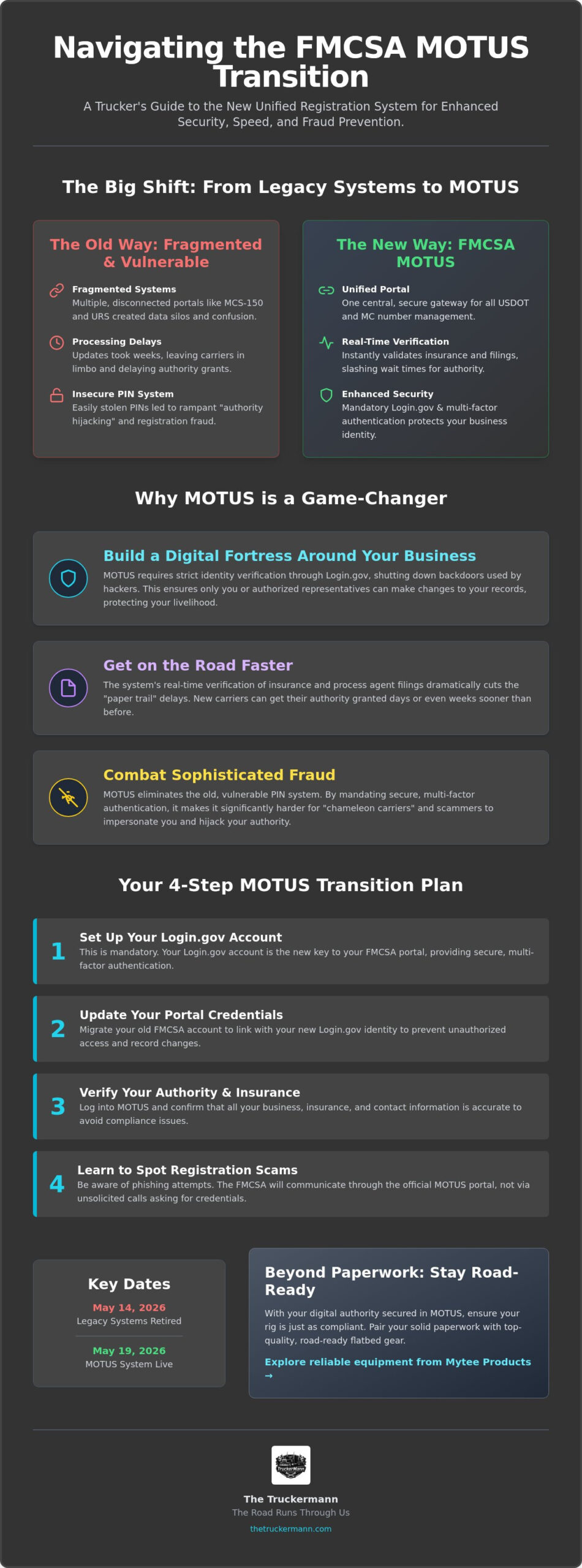
The Federal Motor Carrier Safety Administration (FMCSA) has finally pulled the plug on the clunky, fragmented systems we’ve wrestled with for years. FMCSA MOTUS is the new, mandatory gateway for all USDOT and MC number management in 2026, serving as the single point of entry for your business’s legal identity. It isn’t just a minor update; it’s a complete replacement for legacy systems like the MCS-150 biennial update and the Unified Registration System (URS). This shift represents a move toward real-time data validation and much tighter security protocols to keep your authority safe from hackers. By consolidating multiple registration functions into one portal, the agency aims to cut through the red tape that often slows down new applications and insurance filings.
To better understand this concept, watch this helpful video:
The End of Legacy Systems: Why MOTUS Matters Now
The old way of doing things was a mess of data silos and processing delays that left carriers in limbo. Legacy systems often failed to communicate, leading to those frustrating gaps where your insurance was filed but your authority still showed as “pending.” The May 14, 2026, deadline marked the official retirement of those old portals, making it critical for you to transition before the new system went live on May 19. If you missed that window, you’re likely feeling the pressure of the current rollout glitches, but moving to this modernized platform is the only way to handle your biennial updates and keep your records current without risking a lapse in authority.
Who is Required to Use the MOTUS System?
Whether you’re an interstate owner-operator, a fleet manager overseeing hundreds of units, or a private carrier, this system is your new home base. New entrants will use FMCSA MOTUS to secure their initial authority, while seasoned veterans will rely on it to maintain their compliance status. Keeping your paperwork solid in the portal is just as vital as keeping your iron in top shape. Just as you follow a dot inspection level 1 checklist to pass a roadside exam, you’ll need to follow the new digital protocols to pass the agency’s scrutiny. When you’ve got your registration locked down, you can focus on the physical side of safety with high-quality gear from Mytee Products, ensuring your flatbed is as compliant as your paperwork.
Why the FMCSA Launched MOTUS: Security, Speed, and Fraud Prevention
The launch of FMCSA MOTUS isn’t just about a prettier website; it’s about building a digital fortress around your livelihood. For years, the industry has dealt with what some call the “Solar Winds” of trucking, where hackers and scammers make unauthorized changes to carrier records to steal freight or hijack authorities. This new system shuts those backdoors by requiring stricter identity verification. It puts you back in the driver’s seat of your own data, ensuring that only you or your authorized representatives can touch your filings. By centralizing everything into one secure portal, the agency is finally treating your business identity with the respect it deserves.
Speed is the other side of this coin. We’ve all felt the sting of “paper trail” delays where a simple update takes weeks to process. FMCSA MOTUS introduces real-time verification of insurance and process agent filings, which significantly slashes the wait times for authority grants. This means new business startups can get their wheels turning days or even weeks faster than before. If you’re looking for official guidance on these technical shifts, the FMCSA’s MOTUS Resources Hub provides the latest regulatory deep dives. The system also integrates more tightly with ELD compliance data, creating a clearer and more accurate safety score that reflects how you actually operate on the road.
Fighting Registration Fraud in 2026
Scammers have become incredibly sophisticated, often impersonating federal officials to trick you into giving up your PIN. MOTUS fights this by eliminating the old, easily stolen PIN system in favor of secure, multi-factor authentication. This makes it much harder for “chameleon carriers” to hide their history or for fraudsters to take over your MC number. Our industry relies on a fraternal bond of trust, and that bond is only as strong as the data supporting it. When every carrier’s record is clean and verifiable, we all win because the bad actors get pushed out of the market.
Streamlining the Approval Pipeline
The goal here is a single “source of truth” for all your federal filings. In the past, state-level DOT offices and federal databases didn’t always talk to each other, leading to compliance headaches at the scale house. MOTUS improves this communication, ensuring that when you update your info, it reflects across the board almost instantly. This reduces red tape and keeps your operation road-ready. While you handle the digital side of security, don’t forget the physical side. Keeping your cargo secure with reliable straps and chains from Mytee Products is just as important as securing your DOT number. For more tips on keeping your operation running smooth, check out the resources at thetruckermann.com.
How to Transition to MOTUS: A Step-by-Step Preparation Guide
Transitioning your business to FMCSA MOTUS isn’t something you want to tackle while you’re fighting traffic on a deadline. The system received 120,000 applications in its first week alone, and that volume has caused some technical friction. To get through the migration without getting stuck in a digital ditch, you need to have your paperwork ready before you click that first button. Grab your Federal Employer Identification Number (EIN), your USDOT number, and that old paper PIN you’ve hopefully kept in a safe spot. This isn’t just about filing forms; it’s about claiming your digital territory.
If you’re already an established carrier, you won’t just start a new profile. You have to “claim” your existing record to bring your history into the new system. Follow these steps to secure your account:
- Step 1: Access the new portal and select the “Claim Company” option on the dashboard.
- Step 2: Enter your USDOT number and the current PIN associated with your account to verify ownership.
- Step 3: Link your business record to your mandatory Login.gov account to finalize the migration.
- Step 4: Review your migrated data immediately to ensure your insurance and authority status displayed correctly.
The Login.gov Requirement: Your Digital Key
The agency has ditched proprietary passwords for Login.gov, a centralized authentication method used across many federal branches. This move adds a heavy layer of security, but it can be a headache if you aren’t prepared for multi-factor authentication (MFA). When you’re on the road, rely on authentication apps rather than text messages, as cell service can be spotty at remote rest stops. Some drivers have reported a “QR code loop” during setup; if this happens, try clearing your browser cache or using a different device to break the cycle. Don’t make the mistake of linking a personal email you don’t check often to your business entity, as this is where your critical compliance alerts will land.
Updating Your MCS-150 Before the Migration
A clean record in the legacy system is the secret to a smooth move. If your MCS-150 is outdated or contains errors, those mistakes will follow you into the new portal and trigger system flags that could halt your insurance processing. Double-check that your interstate vs intrastate status is marked accurately for your specific operation. Ensure your “legal name” matches your IRS tax records exactly down to the last comma. While you’re cleaning up your digital files, take a moment to inspect your physical gear. Using high-quality straps and securement tools from Mytee Products ensures that once your paperwork is compliant, your load is just as secure.
Protecting Your Authority: Combatting Scams in the MOTUS Era
Protecting your authority in this new digital landscape requires a sharp eye and a healthy dose of skepticism. You should treat your FMCSA MOTUS login credentials with the same professional care you apply to your cdl pre trip inspection checklist. Just as a cracked frame or a leaking hub seal can sideline your rig, a single leaked password can ground your entire operation. Scammers are currently working overtime to exploit the transition, using the confusion of the new system to trick you into handing over the keys to your business. We’ve seen it before with every major regulatory shift, but the high-tech nature of this rollout makes the stakes even higher.
The most common threat right now is the “Authority Hijack.” Fraudsters are scouring old databases for leaked PINs to take over carrier records before the rightful owners can claim them in the new portal. Once they’re in, they can change your bank details or insurance information, effectively stealing your identity and your revenue. It’s a high-stakes game, and the best defense is a proactive offense. Claim your account immediately and set up that multi-factor authentication we discussed earlier. Don’t leave your digital door unlocked while you’re parked at a truck stop or resting between loads.
Red Flags for Every Owner-Operator
Scams often arrive as high-pressure texts or emails claiming your authority has been “suspended” due to a MOTUS error. These messages usually push you to click a link and enter your credit card info to “reactivate” your status. Stop right there. The agency will never ask for payment via text or through a non-government website. Always look at the URL in your browser’s address bar. If it doesn’t end in .gov, it is a fake. Don’t rely on a quick Google search for support numbers either, as scammers often pay for ads to put their fraudulent “help” lines at the top of the search results. Use the official contact info found directly within the secure portal.
The “Free vs. Paid” Registration Debate
You’ll likely see an influx of mailers from “registration services” offering to handle your FMCSA MOTUS migration for a hefty fee. While a consultant can be helpful for complex fleet structures with dozens of units, most owner-operators can handle these updates for free. The system was designed to be user-friendly so you don’t have to pay a middleman for a simple biennial update. Keeping control of your own federal records isn’t just about saving money; it’s about knowing exactly what the government sees when they look at your business. For more strategies on keeping your business secure and profitable, visit thetruckermann.com. And when it comes to physical security, don’t cut corners; grab your heavy-duty load locks and straps from Mytee Products to keep your cargo as safe as your data.
Beyond Registration: Keeping Your Operation Road-Ready in 2026
Once the digital dust settles on your FMCSA MOTUS migration, it’s time to shift your focus back to the physical reality of the road. Your authority is active, your records are clean, and your digital identity is locked down. Now, you need to make that paperwork pay off. Administrative cleanliness in the portal isn’t just about avoiding a fine; it’s about looking like a professional to every broker and insurance adjuster who pulls your file. A clean digital record often leads to better insurance rates because it signals that you’re an organized, low-risk operator who stays on top of the details. When the government’s database shows you’re compliant, you’ve cleared the first hurdle to securing higher-paying freight.
To keep your wheels turning and your revenue climbing, you need to leverage tools like 123Loadboard. This platform helps you find the loads that justify the effort you’ve put into mastering the new federal systems. When you have a solid “source of truth” in FMCSA MOTUS, you can bid on premium freight with total confidence, knowing that a paperwork glitch won’t leave you sitting at a scale house while someone else hauls your profit. Using 123Loadboard ensures you’re spending less time hunting for work and more time actually moving it.
Investing in Your Professional Growth
Staying ahead of regulations is a massive competitive advantage in today’s market. While other carriers are struggling with system lockouts or “Unauthorized Access” screens, you’re already verified and road-ready. Use the quiet hours during your 34-hour restart to check for system updates on your tablet or phone. There is a real psychological benefit to knowing your back office is as secure as the load on your deck. Being a master of your own data means you’re not just surviving the industry; you’re running a business that’s built to last.
The Essential Gear for 2026 Compliance
Physical maintenance and digital compliance are two sides of the same coin. A clean MVR starts with a truck that’s equipped with the best safety gear available. Don’t let a frayed strap or a weak chain undo all the hard work you did in the registration portal. We trust Mytee Products for the heavy-duty securement equipment that keeps flatbeds compliant and safe. Stocking your rig with gear from Mytee Products ensures you’re prepared for any roadside inspection. We’re a brotherhood out here, and staying vigilant together about both our gear and our records is how we all keep moving forward. Keep your head on a swivel, keep your data secure, and keep your iron tight.
Secure Your Authority and Take the Lead
The road ahead in 2026 demands more than just grit; it requires a sharp digital eye and a total commitment to administrative excellence. Transitioning to FMCSA MOTUS is a major milestone for your business, providing the security and speed needed to thrive in a volatile market. By claiming your account, setting up Login.gov, and staying vigilant against registration scams, you protect the livelihood you’ve worked so hard to build. Remember that a clean digital record and a well-maintained rig are your best tools for securing high-paying loads and maintaining a top-tier safety score.
As a veteran-managed resource, we’re here to ensure your back office is as solid as your load securement. We provide up-to-the-minute regulatory updates and direct links to official equipment that keeps you moving. Stay road-ready and compliant by getting the best flatbed gear at Mytee Products. To master every aspect of your career, visit thetruckermann.com for the latest industry insights. Keep your head up, your iron tight, and your data secure. You’ve got the skills to master this system and lead the pack.
Frequently Asked Questions
Is MOTUS replacing the MCS-150 biennial update?
Yes, FMCSA MOTUS completely replaces the legacy MCS-150 biennial update process. You’ll now handle all your fleet size updates and mileage reporting directly through this unified portal. It’s designed to stop the data silos that used to cause delays between your updates and your public safety profile. Keeping your info current here is just as vital as keeping your trailer secure with gear from Mytee Products.
Do I need a new Login.gov account for the MOTUS system?
You absolutely need a Login.gov account to access the new system. The agency has moved away from its old proprietary login methods to provide a more secure, centralized way for you to manage your federal records. If you already have a Login.gov account for other government business, you can use that. Just make sure your email matches what the agency has on file to avoid any identity verification headaches.
What happens if I miss the MOTUS preparation deadline in 2026?
Missing the 2026 rollout deadlines can lead to immediate operational disruptions. Since the old systems were retired on May 14, 2026, failing to migrate means you can’t update your insurance or process renewals. This could result in your authority being falsely shown as inactive or uninsured. Don’t let a paperwork delay ground your rig; get your account claimed before your next biennial update is due.
Can I still use my old FMCSA Portal PIN in the MOTUS system?
Your old FMCSA Portal PIN is only used for the initial “claim” of your company record. Once you’ve successfully linked your USDOT number to your new profile, the old PIN becomes obsolete for daily logins. From that point on, your Login.gov credentials and multi-factor authentication are the only keys you’ll need. It’s a much safer way to keep scammers from hijacking your hard-earned authority.
How much does it cost to register a new company in MOTUS?
The cost for registering a new entity depends on the specific type of authority you’re seeking. While the FMCSA MOTUS platform itself is a free government portal, standard federal filing fees for new motor carrier or broker authorities still apply. You’ll pay these fees directly through the secure portal using authorized payment methods. Always verify you’re on a .gov site before entering any financial information to avoid being overcharged by third-party sites.
How do I know if a MOTUS-related email is a scam?
A legitimate FMCSA MOTUS notification will never ask for your credit card number or social security info via text or a direct email link. Scammers often use high-pressure language, threatening to suspend your authority within hours if you don’t pay a fee. Real government emails will always point you back to the official .gov website. If the link looks suspicious, log in directly through your browser to check your status.
Is the MOTUS system compatible with mobile devices for on-the-road updates?
The new portal is fully responsive and built to work on your smartphone or tablet while you’re at a truck stop. This mobile compatibility means you can handle your compliance tasks during your 34-hour restart without needing a laptop. It’s a massive improvement for owner-operators who live their lives on the road. Just ensure you’re using a secure connection when accessing your sensitive business data.
Can my process agent or insurance company access my MOTUS account?
Your process agent and insurance provider will have their own specific access points to upload required filings like the BOC-3 or policy renewals. They won’t need your personal Login.gov password to do their jobs. You remain the master admin of your account, which allows you to see exactly when they’ve completed their filings. This transparency helps you ensure your operation stays road-ready with the right paperwork and Mytee Products equipment.
Disclaimer
The information provided on The TruckerMann is for general informational and educational purposes only. While every effort is made to ensure the accuracy and reliability of the content, trucking laws, FMCSA regulations, DOT requirements, safety standards, and industry policies can change at any time. Readers are encouraged to verify all information with official government agencies, professional advisors, or qualified industry professionals before making business, legal, financial, safety, or compliance-related decisions.
The content shared on this website reflects personal opinions, experiences, research, and commentary and should not be considered legal, financial, medical, tax, or professional advice. The TruckerMann and its owners, contributors, affiliates, or representatives are not responsible for any losses, damages, violations, penalties, or liabilities resulting from the use or misuse of information found on this website.
Some content on this website may contain affiliate links, sponsored content, or promotional material. This means we may earn a commission at no additional cost to you if you choose to purchase through certain links.
By using this website, you agree that you do so at your own discretion and risk.