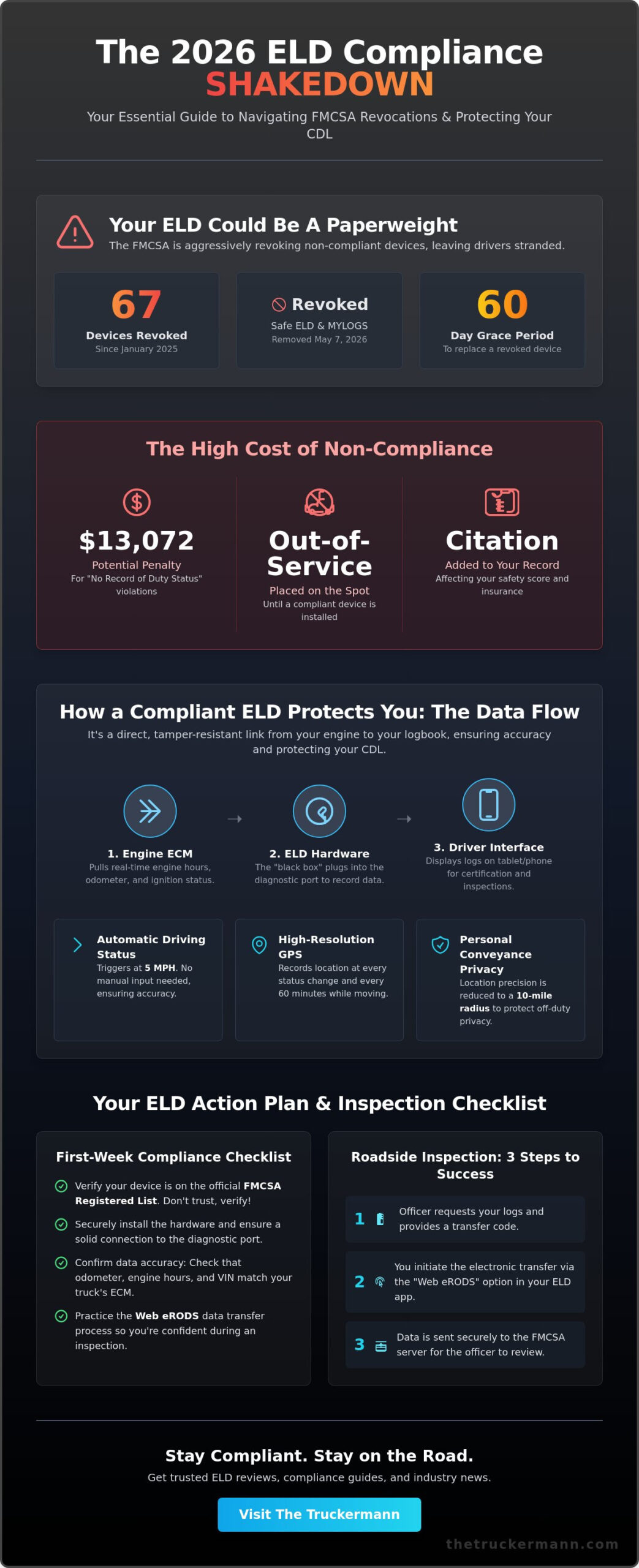
Hey Friend, imagine pulling into a weigh station only to find out the ELD you paid for is now a paperweight because the FMCSA revoked its registration while you were mid-haul. Since January 2025, the agency has scrubbed 67 devices from its approved list, including the May 7, 2026, removal of Safe ELD and MYLOGS. If you’re caught running one of these after the 60-day grace period, you aren’t just looking at a “No record of duty status” citation. You’re getting parked out-of-service and facing potential penalties of up to $13,072 for violations.
The Truckermann knows you’re tired of glitchy hardware and the feeling that every new regulation is just another way to pick your pocket. It’s frustrating to keep track of technical modifications when you’re just trying to keep the wheels turning and protect your livelihood. This guide helps you cut through the noise so you can master the 2026 compliance landscape, understand why eDVIRs are finally legal, and choose a device that keeps the DOT off your back. We’ll look at the shift toward data-driven safety and show you exactly how to pass a Level 1 inspection without a single log issue.
Key Takeaways
- Learn how a properly synced eld protects your CDL by replacing paper logs with tamper-resistant data pulled directly from your engine’s ECM.
- Understand the automatic triggers and the 5 MPH status threshold to ensure your clocks are always accurate when the DOT comes knocking.
- Compare the long-haul reliability of hardwired hardware against BYOD systems to find the best ROI for your specific operation.
- Master the Web eRODS transfer process so you can navigate roadside inspections with the steady confidence of a seasoned veteran.
- Follow our first-week checklist to verify your data accuracy and secure your hardware before you hit the big roads.
What is an ELD and Why is it Essential in 2026?
Hey Friend, the days of the “comic book” paper log are long gone. An Electronic Logging Device (ELD) isn’t just a tablet on your dash; it’s a piece of hardware that plugs into your truck’s diagnostic port to sync directly with the engine. Its core mission is simple: it records your Hours of Service (HOS) automatically to ensure your records are accurate and tamper-resistant. If you’re a driver of a commercial motor vehicle (CMV) who is already required to keep Records of Duty Status (RODS), this device is your constant companion on the road.
In 2026, the FMCSA isn’t playing games with compliance. They’ve shifted from simply mandating the technology to aggressively auditing the market. We’re seeing a massive crackdown on self-certified devices that don’t actually meet technical standards. This vigilance protects the industry from bad actors, but it also means you have to be more observant than ever about the gear you trust with your CDL. The Truckermann has seen too many good drivers get hung out to dry because they trusted a cheap, glitchy device. Accurate logging isn’t just about satisfying a DOT officer; it’s your primary defense against carrier coercion and a way to ensure you’re getting paid for every minute you’re behind that wheel.
To better understand this concept, watch this helpful video:
ELD vs. AOBRD: Clearing the Confusion
AOBRDs (Automatic On-Board Recording Devices) were the old standard, but they’ve been obsolete for years. The main difference comes down to precision and data transparency. While AOBRDs were loose with data recording, the current eld standard requires high-resolution GPS tracking and specific data transfer methods for roadside inspections. 2026 marks a point of total standardization where any legacy tech still floating around is a magnet for a Level 1 inspection headache. If your device isn’t providing the required data transfer protocols, you’re basically inviting an officer to dig deeper into your truck.
The 2026 Revocation Alert: Is Your Device Legal?
You need to keep a sharp eye on the official FMCSA list. On May 7, 2026, the agency officially revoked the registration for Safe ELD and MYLOGS ELD. This isn’t an isolated event; the FMCSA has stripped the registration of 67 devices since January 2025. If your provider gets the axe, you’ve only got a 60-day grace period to find a compliant replacement. After that, you’re running illegal and could be placed out-of-service. Always verify your provider on the FMCSA self-certification portal to make sure your livelihood isn’t at risk because of a manufacturer’s failure. To stay safe, visit the FMCSA website and search for your specific model; if it isn’t listed as “Registered,” it’s time to start shopping for a new unit immediately.
How ELDs Work: Understanding the Data Flow
Hey Friend, understanding the guts of your logging system is the best way to keep yourself out of a bind during a roadside inspection. Your device isn’t just a fancy clock; it’s a bridge between your truck’s brain and the FMCSA’s database. The hardware “black box” plugs directly into your diagnostic port, talking to the Engine Control Module (ECM) to pull real-time data on engine hours, odometer readings, and ignition status. This constant communication ensures that every mile you roll is accounted for with pinpoint accuracy.
The most critical thing to remember is the 5 MPH threshold. Under the technical specifications of the FMCSA ELD rule, once your truck hits that speed, the device automatically triggers a “Driving” status. You don’t have to touch a button. The machine knows. While the GPS records your location at every change of duty status and every 60 minutes while in motion, it does respect your privacy. During “Personal Conveyance,” the precision of that location data is reduced to a 10-mile radius to keep your off-duty business your own.
The Data Elements Being Recorded
- Engine and Motion Data: This includes total engine hours, ignition status, and the exact odometer reading at every event.
- Identification: Your driver ID, motor carrier USDOT number, and the vehicle’s VIN are baked into every data packet.
- Duty Status Changes: The system captures the transition between Driving, On-Duty (Not Driving), Off-Duty, and Sleeper Berth.
Manual vs. Automatic Entries
You have some control over your logs, but the machine has the final say on the big stuff. You can add annotations or correct an “On-Duty” segment if you forgot to switch, but you can never edit or shorten automatic “Driving” time. If the truck moves without a driver logged in, the system creates “Unassigned Driving” events. You must reconcile these daily to prove you weren’t “ghost driving” to save hours. If you find yourself struggling with these technical hurdles, checking out real-world driver tips can help you stay ahead of the curve. Failing to certify your logs at the end of every 24-hour period is a direct violation of federal law that can lead to fines and a hit to your CSA score.
Choosing the Best ELD: A Framework for Owner-Operators
Hey Friend, choosing an eld isn’t just about checking a box for the FMCSA. It’s about finding a tool that works as hard as you do. When you’re looking at the market in 2026, the big debate is still hardwired hardware versus BYOD (Bring Your Own Device) setups. Hardwired units plug directly into the ECM and stay there, providing a stable connection that doesn’t rely on your phone’s spotty Bluetooth. For long-haul drivers who can’t afford a log failure in the middle of a “Roadside Inspection Blitz,” the reliability of a hardwired system is usually worth the extra peace of mind.
You’ve got to look at the true ROI, not just the sticker price. While upfront hardware costs for a quality unit often range from $100 to $300, the real value lies in the subscription features. A system that integrates with your dispatch software or automates your IFTA reporting can save you hours of grueling paperwork every quarter. More importantly, 24/7 technical support is a non-negotiable requirement. If your device glitches at 3:00 AM on an isolated stretch of highway, you need a human on the phone who can walk you through a fix before you hit the next scale. According to official ELD rule information, these mandates are designed to create a safer work environment, but that only happens if your tech actually stays online and functional.
Compliance Leaders: J. J. Keller and Beyond
Veteran drivers often stick with established names because they’ve seen fly-by-night tech companies disappear overnight, leaving carriers with useless hardware. J. J. Keller remains a top choice for many because their systems are built specifically for the rugged cab environment. You need a user interface that is intuitive. If you can’t navigate the screen with work gloves on or read the display in direct sunlight, the device becomes a distraction rather than a tool. For a deeper look at these industry standards, check out our J. J. Keller Buying Guide to see which models are dominating the road this year.
ELDs and Business Growth
Your logging data is a goldmine for your business if you know how to use it. Smart owner-operators use telematics to track fuel efficiency and cut down on costly idle time. Clean, consistent logs also lead to better CDL rankings, which makes you a more attractive prospect for high-paying brokers and shippers. Some insurance providers are even offering premium discounts for drivers who share their safety data. It’s about taking that “spy-in-the-cab” and turning it into a profit-generating partner that protects your bottom line. To understand exactly how those per-mile rates are shifting in your favor right now, check out the latest freight rate trends for truck drivers 2026 so you can negotiate from a position of strength.
Roadside Inspection Survival: Managing Your ELD Under Pressure
Hey Friend, when those blue lights flicker in your mirror and you’re pulled into a scale house, your heart rate naturally spikes. This is where the psychological game begins. An officer isn’t just looking at your logs; they’re watching how you handle your gear. If you’re fumbling with your eld or acting nervous, you’re giving them a reason to dig deeper. The first step to surviving a roadside inspection is confidence in your equipment and a calm demeanor.
When the officer asks for your logs, you’ll likely initiate a transfer via Web eRODS. You enter a code provided by the officer, hit send, and the data goes straight to their laptop. If the telematics fail, you must be ready to use the “Display and Print” method. This means your screen must be mounted and positioned so the officer can read it without entering the cab. If the device flatlines right there on the shoulder, don’t panic. You have a legal right to use paper logs, provided you follow the specific malfunction protocols we’ve discussed.
The 8-Day Paper Log Rule
Even in 2026, you can’t rely 100% on silicon and software. You’re required to carry a physical logbook with enough blank pages to cover at least 8 days. If your device fails, you must immediately reconstruct your logs for the current day and the previous 7 days on paper. You have exactly 24 hours to notify your carrier about the failure. Being prepared for a technical glitch is just as important as having the Essential Tools for Cargo Securement in your side box. If you can’t show a record of duty status, you’re getting a ticket and a potential out-of-service order.
Common ELD Violations (and How to Avoid Them)
- Missing Documentation: While the FMCSA eliminated the physical paper manual requirement in 2026, you must still have a digital data transfer instruction sheet ready to show the officer.
- Uncertified Logs: Failure to certify your logs for the previous 7 days is a common “low-hanging fruit” violation that officers love to cite.
- Unassigned Driving Time: If there are miles on the odometer that haven’t been assigned to a driver, you need to have a clear explanation or annotate them before the inspection starts.
Staying on top of these small details makes the difference between a 15-minute stop and a 2-hour ordeal. Part of that preparation means knowing your route inside and out — including understanding what every truck sign means along your corridor so you’re never caught off guard by a restriction or a weight limit before you reach the scale. For more help staying compliant on the road, check out our latest roadside survival guides.
Setting Up for Success: Implementation and Training
Hey Friend, once you’ve picked your device, the real work of implementation begins. You can’t just toss the hardware under the seat and hope for the best. Installation 101 is about securing that unit so it doesn’t rattle or disconnect when you hit a pothole in a construction zone. Use industrial-strength zip ties to lock the connection to your diagnostic port. A loose cable is a fast track to a malfunction code, and an officer won’t care if it was just a loose wire when they’re writing you up for a log violation.
Your first week with a new eld is a trial run for your livelihood. Don’t just trust the screen; verify the data accuracy against your actual movements at every stop. This is the time to develop the habit of status changes. If you wait until you’re in the sleeper to fix your day, you’re going to miss something. Train your brain to make the status change the very first thing you do when those air brakes pop. It needs to be as automatic as checking your mirrors. Consistency is your best friend when you’re trying to protect your CDL from unnecessary scrutiny.
Essential In-Cab ELD Documentation
Even though the FMCSA dropped the physical manual requirement in early 2026, you still need specific cheat sheets to pass a Level 1 check. You must carry an ELD Cab Card that explains how to use the device and, more importantly, how to transfer data to an officer. You also need an instruction sheet that outlines exactly what to do if the device malfunctions. Don’t bury these in the back of your sleeper berth. Store them in a clear visor pocket or a dedicated compliance folder right next to your registration and insurance. If you’re digging through a messy cab during a “Roadside Inspection Blitz,” you’re already losing the officer’s trust before the inspection even starts.
Mastering the Pre-Trip Log Check
Compliance doesn’t start when you hit the highway; it starts in the yard. You should be adding a log check to your CDL pre-trip inspection every single morning. Take thirty seconds to check for firmware updates before you pull out of the gate. A missed update can lead to data transfer failures or glitchy GPS tracking during an inspection. Ensure your mobile device is mounted securely and plugged into a reliable power source. A dead battery mid-trip is an unforced error that can cost you thousands in fines and lost time. Remember, the road runs through us, and keeping your logs clean is the only way to stay on it for the long haul.
Master the Road with Confidence
Hey Friend, the road ahead is changing fast, but you don’t have to face it alone. Staying compliant in 2026 means more than just having a device on your dash; it’s about being proactive. We’ve seen the FMCSA revoke 67 different devices since January 2025, proving that the hardware you choose is your first line of defense. By mastering your pre-trip tech checks and understanding the Web eRODS transfer process, you ensure that no “Roadside Inspection Blitz” can derail your schedule or your paycheck. Professional driver-tested advice and 2026 FMCSA regulation updates are your best tools for keeping your CDL clean and your business profitable.
The Truckermann is here to walk this path with you, providing the camaraderie-driven industry insights you need to stay ahead of the curve. Don’t let a glitchy eld or an outdated manual be the reason you’re parked at a scale house. It’s time to take control of your compliance so you can focus on what really matters: watching the miles roll and getting home safe. For the best gear to keep you legal and moving, explore The Truckermann’s recommended compliance solutions. Remember, the road runs through us, and we’re dedicated to making sure it stays wide open for you. Keep those wheels turning.
Frequently Asked Questions
What happens if my ELD loses cellular connection in a dead zone?
Your eld will continue to record all engine data and duty status changes to its internal memory even without a signal. The hardware doesn’t need a live cellular link to track your hours; it only needs that connection to sync data with the home office or the FMCSA server. Once you roll back into a service area, the device automatically uploads the cached records to ensure your logs are up to date.
Can a DOT officer search my entire phone if I use an ELD app?
No, a DOT officer is legally restricted to viewing only the specific hours of service data required for the roadside inspection. Using a personal smartphone for a “Bring Your Own Device” setup does not grant law enforcement the right to browse your private photos, text messages, or other applications. To protect your privacy, many drivers use a dedicated tablet mounted on the dash to keep their personal phone out of the officer’s hands entirely.
How long am I required to keep my ELD records?
Motor carriers must retain ELD records and all supporting documents, such as fuel receipts and bills of lading, for at least 6 months. As a driver, you are required to have the current 24-hour period and the previous 7 consecutive days available for inspection at all times. Keeping these records organized is your best defense against audits that can happen long after you’ve finished a haul.
What are the specific ELD exemptions for short-haul or older trucks?
Drivers of vehicles with engines manufactured before the year 2000 are exempt from the mandate because those older ECMs cannot reliably sync with modern logging hardware. Additionally, short-haul drivers who stay within a 150 air-mile radius and return to their work reporting location within 14 hours are not required to use an electronic log. These drivers still must maintain accurate time records, but they aren’t forced into the full digital ecosystem.
Can I edit my driving time if I forgot to log out?
You cannot edit, shorten, or delete any automatically recorded driving time under the current FMCSA regulations. While you can add annotations to explain a mistake or edit “On-Duty” and “Off-Duty” segments, the 5 MPH threshold locks in your driving status to prevent log tampering. If you made a mistake, your only option is to add a detailed remark to the log event so an officer understands the situation during an inspection.
What should I do if my ELD provider is removed from the FMCSA registry?
You must replace your device within 60 days if the FMCSA revokes your provider’s registration. For instance, after the May 7, 2026, revocation of Safe ELD, carriers had until July 7 to find a compliant alternative. If you’re caught using a revoked device after that two-month grace period, you’ll be cited for failing to have a record of duty status and likely placed out-of-service on the spot.
Is an ELD required for intrastate-only driving?
Most states have now adopted the federal eld standards for intrastate commerce, meaning you likely need one even if you never cross a state line. While some states have minor variations for specific industries, the general rule is that if you are required to keep a record of duty status, you must do it electronically. It’s always best to check your specific state’s DOT handbook to see if they offer any local waivers.
How do I handle ‘Personal Conveyance’ on my ELD without violating HOS?
Personal Conveyance is only for off-duty travel that is completely unrelated to your work or the movement of the load. You must select the “Personal Conveyance” status on your device and provide a clear annotation, such as “Driving to restaurant from motel.” You cannot use this status to bypass HOS rules by “advancing the load” toward a destination, as officers can easily spot this during a data review.
Disclaimer
The information provided on The TruckerMann is for general informational and educational purposes only. While every effort is made to ensure the accuracy and reliability of the content, trucking laws, FMCSA regulations, DOT requirements, safety standards, and industry policies can change at any time. Readers are encouraged to verify all information with official government agencies, professional advisors, or qualified industry professionals before making business, legal, financial, safety, or compliance-related decisions.
The content shared on this website reflects personal opinions, experiences, research, and commentary and should not be considered legal, financial, medical, tax, or professional advice. The TruckerMann and its owners, contributors, affiliates, or representatives are not responsible for any losses, damages, violations, penalties, or liabilities resulting from the use or misuse of information found on this website.
Some content on this website may contain affiliate links, sponsored content, or promotional material. This means we may earn a commission at no additional cost to you if you choose to purchase through certain links.
By using this website, you agree that you do so at your own discretion and risk.